
ClickCease Skip to main content
diy tips

How to Align Garage Door Safety Sensors

Garage door won't close? Misaligned safety sensors are the likely culprit. Learn how to align them yourself in minutes.

E
Ez2Fix Team
Ez2Fix Expert
How to Align Garage Door Safety Sensors

If your garage door starts to close, stops, and reverses back up (often with the opener lights flashing), your safety sensors are doing their job—or they think they are. These sensors prevent the door from closing on people or objects. If they get bumped out of alignment, they “think” there’s an obstruction.

How They Work

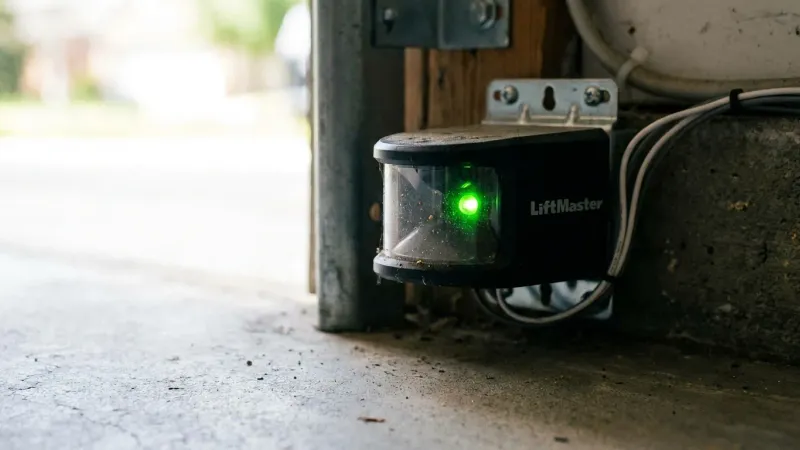
There are two sensors: a sender (amber light) and a receiver (green light). They shoot an invisible beam across the door opening. If the beam is broken, the door won’t close.

Steps to Align Sensors

  1. Clean the Lenses: Use a soft cloth to wipe away spiderwebs, dust, and dirt from both lenses.
  2. Check the Lights: Look at the LEDs on both sensors.
    • Amber Light (Sender): Should always be solid. If it’s off, check the wiring.
    • Green Light (Receiver): Should be solid. If it’s off or flickering, it’s not seeing the beam.
  3. Adjust the Receiver: Loosen the wing nut on the receiving sensor bracket. Gently rotate the sensor up, down, or side-to-side until the green light glows solid and bright.
  4. Tighten the Bracket: Once aligned, hold the sensor in place and tighten the wing nut.
  5. Test the Door: Try closing the door with the remote. It should close smoothly.

Wiring Issues

If the lights won’t come on at all, check the wires running from the sensors to the motor unit. Look for staples that might have cut the insulation or loose connections at the terminals.

Need Help?

If you can’t get the sensors to align, the units themselves might be defective. Our technicians can diagnose sensor issues and provide same-day garage door opener repair throughout Northern New Jersey.

Need service in your area? We serve Newark, Jersey City, and all of Northern NJ.

Ready to schedule? Get a free estimate online or call (201) 554-6769.

#diy tips #safety #troubleshooting

How to Align Garage Door Safety Sensors

  1. 1

    Clean the lenses

    Use a soft cloth to wipe away spiderwebs, dust, and dirt from both sensor lenses.

  2. 2

    Check the lights

    Confirm the amber sender light is solid. If the green receiver light is off or flickering, it is not seeing the beam.

  3. 3

    Adjust the receiver

    Loosen the wing nut on the receiving sensor bracket and gently rotate the sensor up, down, or side to side until the green light glows solid and bright.

  4. 4

    Tighten the bracket

    Hold the sensor in place once aligned and tighten the wing nut.

  5. 5

    Test the door

    Try closing the door with the remote. It should close smoothly.

Frequently Asked Questions

Get answers to common questions about this service

Why won't my garage door close all the way?

If the door starts to close then stops and reverses, often with the opener lights flashing, the safety sensors are likely misaligned or blocked. They shoot an invisible beam across the opening, and if that beam is broken the door will not close.

How do I know if my garage door sensors are aligned?

Check the LEDs on both sensors. The sender has an amber light that should always be solid, and the receiver has a green light that should be solid. If the green light is off or flickering, the sensors are misaligned.

How do I align my garage door safety sensors?

Clean both lenses, then loosen the wing nut on the receiving sensor bracket and gently rotate it up, down, or side to side until the green light glows solid and bright. Tighten the wing nut and test the door.

What if the sensor lights won't come on at all?

If neither light comes on, check the wires running from the sensors to the motor unit for staples that cut the insulation or loose connections at the terminals. If you still cannot align them, the sensors may be defective and need professional diagnosis.

Ready to Fix Your Garage Door?

Contact us today for prompt, reliable service in Northern NJ.

Call: (201) 554-6769 Book Online